Colored Map Blips
⬇ Download on Nexus ModsPreview
About This Mod
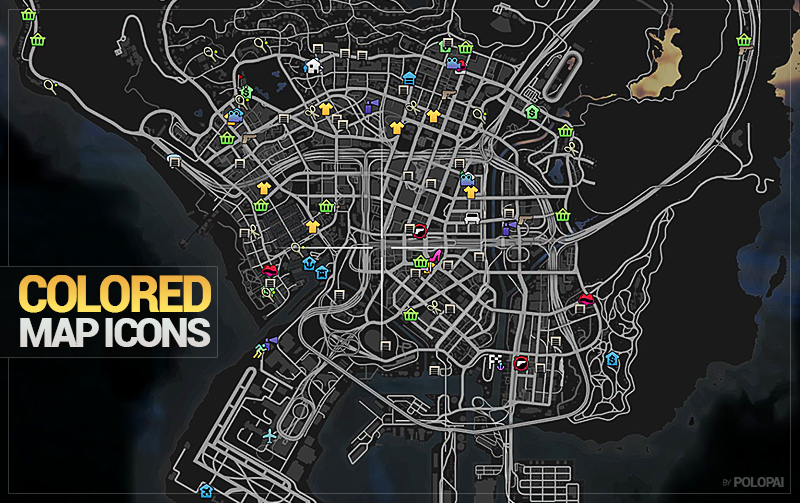
Colored Map Blips 1.0 1.0 (current) 94,757 downloads , May 28, 2015 This file is safe " data-content=" This file has been scanned for viruses and is safe to download. " class="fa fa-shield vt-version"> More mods by Polopai : Misc Texture Radio HUD 4.67 9,213 128 Colorful Radio 1.0 By Polopai Misc Texture HUD 5.0 62,535 620 Colored Weapon Icons 3.1 By Polopai Misc Texture Radio Weapons HUD 4.82 40,971 599 Colorful Icons (Radio + Weapons) 1.3 By Polopai Misc Texture Radio Map HUD Featured 4.75 104,434 903 Colorful HUD (Weapons, Radio & Map Blips) By Polopai More mods in misc category: Graphics 338 5 visualsettings.dat realistic light [Legacy] 1.0 By SUPERDAMIGS10 Support Config 924 11 DLC Cars + Realistic Prices for ImNotMental's PDM 2.0 By FlyingFlag Graphics 4.97 14,334 154 No Chromatic aberration & Lens distortion 1.71 By VenJam1n 94,758 Downloads 679 Likes 4.73 / 5 stars (20 votes) This mod colors the map blips/icons so we don't have to look at the same old boring black and white blips. If you like this mod, consider downloading my other mod that combines all my coloring mods: • Colored Weapon Icons • Colored Radio Icons • Colored Map Blips Download here: INSTALLATION: 1. Download OpenIV from www.openiv.com, install it and open GTA V for Windows. 2. Go to mods/update/update.rpf/x64/patch/data/cdimages/scaleform_minimap.rpf 3. Click on the "Edit Mode" button on the top bar. 4. Then click on the green plus icon that says "Add new file" and import the 'minimap.ytd' provided by this mod (you can find these files inside the 'Modded YTD' folder). 5. Close OpenIV and start the game! NOTE: Make sure you have the latest version of ScriptHookV, otherwise the game will crash when you try to run it. Also, make sure to enable the ASI Loader and OpenIV.asi through OpenIV in order to enable the game to read modified .rpf files. To do so, run OpenIV and go to Tools > ASI Manager and install ASI Loader and OpenIV.asi WARNING: Even though these are just texture mods, you can still get banned for playing online with them, so avoid going into Online mode while using this mod or any other mod. Backup files included. 1.0 • Updated the mod to the latest version of GTA V (Festive Surprise of 2015) • Tweaked some icons and colors 0.9 • Changed the color of the Ammu-Nation blip back to red 0.8 • Colored the Tow Trucking missions blip • Colored Trevor's Dune Buggy missions blip • Colored Trevor's Air Trafficking missions blip • Colored the Rampage missions blip • Colored the Altruist Camp blip • Colored the Epsilon logo blip 0.7 • Colored the Offroad/ATV Race blip • Colored the Stock/Street Race blip • Colored the Bicycle Race blip • Colored the Foot Race blip • Colored the Sea Race blip • Colored the Air Race blip • Colored the Flag icon 0.6 • Colored the Shrink blip • Colored the Speech Bubble blip • Colored the Parachute blip • Colored the Masks Shop blip • Colored the Barber Shop blip • Colored the Vehicle Impound blip 0.5 • Colored the Tenis blip • Colored the G
Mod Details
- Game
- GTA V
- Author
- Polopai
- Version
- .
- Downloads
- 94,758
- Endorsements
- 0
- Category
- misc
- Last Updated
- N/A
How to Install GTA V Mods
Script Hook V + OpenIV/CodeWalker. Never mod GTA Online.
Visit the Nexus Mods page for specific installation instructions for this mod.
⭐ Rate & Review
FAQ
Is Colored Map Blips safe to download?
Linked from Nexus Mods which scans all files for viruses. Always download from the official source.
Does this mod work with the latest game update?
Last updated recently. Check the official download page for version compatibility.
Where can I learn more about GTA V modding?
Check our complete GTA V modding tools guide for step-by-step setup instructions.