Colored Weapon Icons
⬇ Download on Nexus ModsPreview
About This Mod
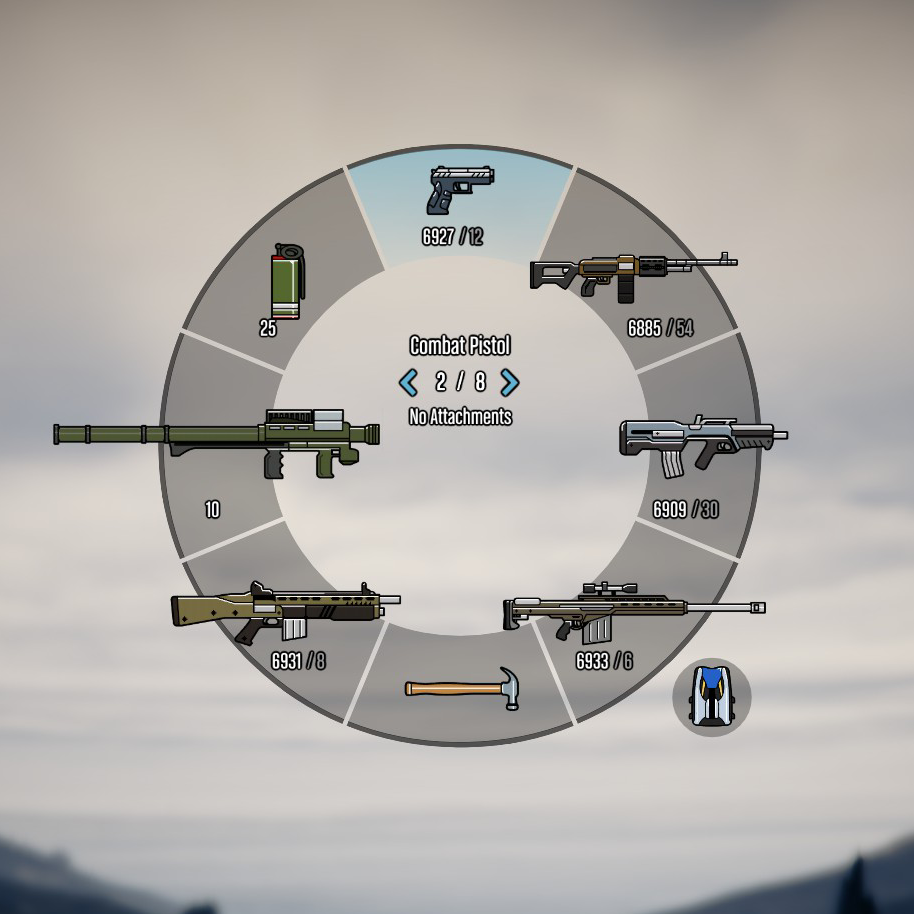
Colored Weapon Icons 3.1 3.1 (current) 62,535 downloads , May 24, 2015 This file is safe " data-content=" This file has been scanned for viruses and is safe to download. " class="fa fa-shield vt-version"> More mods by Polopai : Misc Texture Radio Weapons HUD 4.82 40,971 599 Colorful Icons (Radio + Weapons) 1.3 By Polopai Misc Texture Radio Map HUD Featured 4.75 104,434 903 Colorful HUD (Weapons, Radio & Map Blips) By Polopai Misc Texture Map HUD 4.73 94,758 679 Colored Map Blips 1.0 By Polopai Misc Texture Radio HUD 4.67 9,213 128 Colorful Radio 1.0 By Polopai More mods in misc category: Graphics 339 5 visualsettings.dat realistic light [Legacy] 1.0 By SUPERDAMIGS10 Support Config 925 11 DLC Cars + Realistic Prices for ImNotMental's PDM 2.0 By FlyingFlag Graphics 4.97 14,334 154 No Chromatic aberration & Lens distortion 1.71 By VenJam1n Expand to see all images and videos 62,535 Downloads 620 Likes 5.0 / 5 stars (11 votes) This mod replaces the grayed out weapon icons (in the weapon wheel or when you are in a vehicle) with colored icons. It is now complete and all weapons are colored (including the latest DLC weapons) . GIF: This mod also includes a backup of the original files, in case you want to rever the changes and go back to the old grayed icons (recommended to play safely online). If you like this mod, consider downloading my other mod that combines all my coloring mods: • Colored Weapon Icons • Colored Radio Icons • Colored Map Blips Download here: INSTALLATION: 1. Download OpenIV from www.openiv.com, install it and open GTA V for Windows. 2. Go to update/update.rpf/x64/patch/data/cdimages/scaleform_generic.rpf 3. Click on the "Edit Mode" button on the top bar. 4. Then click on the green plus icon that says "Add new file" and import the 'hud.ytd' and 'mp_big_message_freemode.ytd' provided by this mod (you can find these files inside the 'Modded YTD' folder). 5. Close OpenIV and start the game! Feel free to do the same thing with the original files located inside the 'Backups' folder provided by this mod in order to revert the changes and go back to the old grayed icons. This is recommended if you want to play online, as Rockstar doesn't allow any modded files, even if it's a texture. NOTE: Make sure you have the latest version of ScriptHookV, otherwise the game will crash when you try to run it. Also, make sure to enable the ASI Loader and OpenIV.asi through OpenIV in order to enable the game to read modified .rpf files. To do so, run OpenIV and go to Tools > ASI Manager and install ASI Loader and OpenIV.asi WARNING: Even though these are just texture mods, you can still get banned for playing online with them, so avoid going into Online mode while using this mod or any other mod. 3.1 • Small tweaks and improvements to some icons. 3.0 • Updated the mod to color the latest weapons up until the Festive Surprise Update of 2015. 2.0 • Added an alternative version of the icons with more contrast and saturated colors. There are now two vers
Mod Details
- Game
- GTA V
- Author
- Polopai
- Version
- .
- Downloads
- 62,535
- Endorsements
- 0
- Category
- misc
- Last Updated
- N/A
How to Install GTA V Mods
Script Hook V + OpenIV/CodeWalker. Never mod GTA Online.
Visit the Nexus Mods page for specific installation instructions for this mod.
⭐ Rate & Review
FAQ
Is Colored Weapon Icons safe to download?
Linked from Nexus Mods which scans all files for viruses. Always download from the official source.
Does this mod work with the latest game update?
Last updated recently. Check the official download page for version compatibility.
Where can I learn more about GTA V modding?
Check our complete GTA V modding tools guide for step-by-step setup instructions.