Reshade For QuantV 3.0
⬇ Download on Nexus ModsPreview
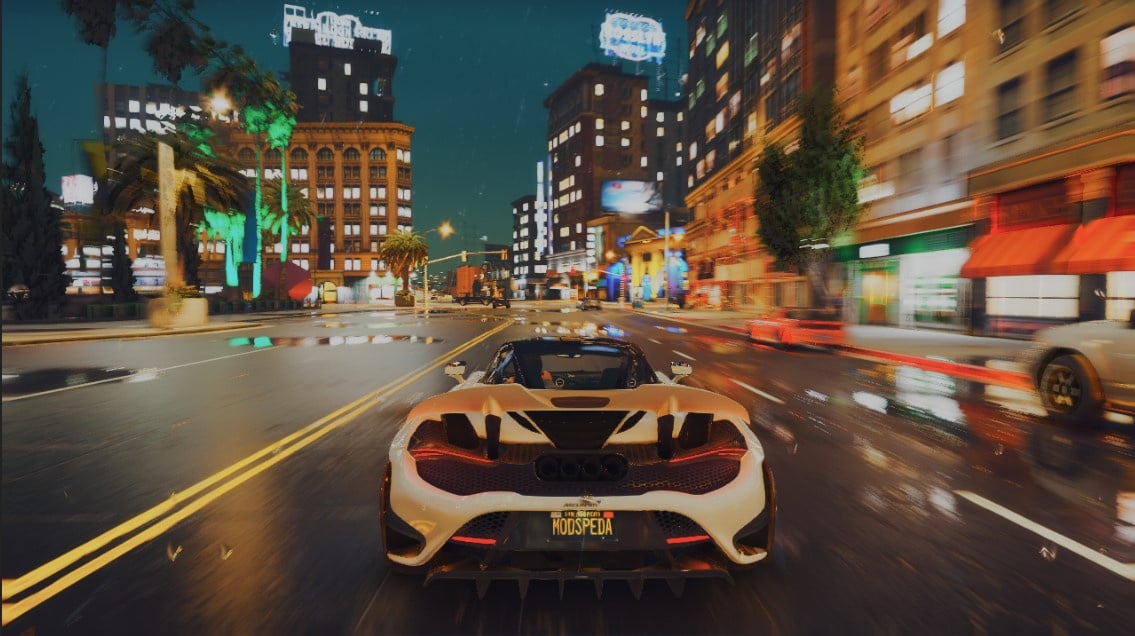
About This Mod
Manual installation Follow this step-by-step guide to install ReShade manually... Download the ReShade installer from reshade.me and run it. Select the target game's .exe and click on the pre-selected graphics API. Confirm the installation of standard shaders when the installer's pop-up message opens. Now download the preset you want to use from the preset page on this website (via the "Download raw preset" button) and paste it into the game's main directory (the one where the .exe is located). Run the game. A ReShade window should appear on startup. (If not, something went wrong.) Press Pos1 / Home to open the ReShade GUI. You'll see a highlighted drop down menu on the upper edge of the ReShade configuration window. Open this menu and select the .ini file you just downloaded. The preset should be loaded by ReShade now. (If not, something went wrong.) Now close the ReShade GUI and enjoy your game's new look!
Mod Details
- Game
- GTA V
- Author
- MOdSpEdiA 7
- Version
- 3.0
- Downloads
- 165,701
- Endorsements
- 0
- Category
- misc
- Last Updated
- N/A
How to Install GTA V Mods
Script Hook V + OpenIV/CodeWalker. Never mod GTA Online.
Visit the Nexus Mods page for specific installation instructions for this mod.
⭐ Rate & Review
FAQ
Is Reshade For QuantV 3.0 safe to download?
Linked from Nexus Mods which scans all files for viruses. Always download from the official source.
Does this mod work with the latest game update?
Last updated recently. Check the official download page for version compatibility.
Where can I learn more about GTA V modding?
Check our complete GTA V modding tools guide for step-by-step setup instructions.